Free & Open Source LAN Screen Sharing Offline
Share your PC screen across local Wi-Fi, Ethernet LAN, or mobile hotspots without an internet connection. Lightweight, portable, and viewable instantly in any web browser.
Everything you need, nothing you don't
Designed with simplicity first. No bloat, no subscriptions, no tracking — just screen sharing that works.
Up and running in seconds
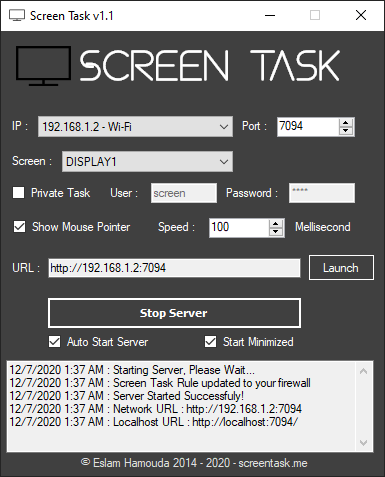
Master Offline Screen Sharing
Step-by-step guides to help you set up local LAN streaming, configure Windows Defender Firewall, and mirror your display to mobile devices.
How to Share PC Screen Over Wi-Fi Without Internet (Mobile Hotspot)
Learn how to turn your Windows PC into an offline Wi-Fi hotspot and stream your display to phones, tablets, or laptops with ScreenTask—no router or internet required.
Troubleshooting ScreenTask: Fixing Connection Refused, Port Conflicts & IP Errors
Step-by-step diagnostic guide to fix ScreenTask when browsers show Connection Refused, incorrect IP address selected, or port 7070 conflicts.
Best Free & Open-Source LAN Screen Sharing Tools for Windows
Compare the best free and open-source tools for sharing your PC screen over local Wi-Fi or LAN without internet: ScreenTask, Deskreen, RustDesk, and VNC.
How to Stream PC Screen to Phone Browser (iPhone & Android Offline)
Step-by-step guide to stream your PC screen to any phone browser (Safari or Chrome) over local Wi-Fi. Free, zero apps needed, and completely offline.
Loved by teams worldwide
"I recently discovered ScreenTask and I'm so happy I did! It's been a great way to share my screen with teammates and clients alike. The video quality is always top notch. Highly recommend!"
"I've been using ScreenTask for 3 years now and it's been a great experience. The setup was quick and easy, and the quality of the screen sharing is really good. Perfect App!"
"ScreenTask has been a lifesaver for our team. We're able to quickly and easily share our screens and collaborate on projects in real-time. The app is intuitive and easy to use."
Common questions
Open-source screen sharing made simple
ScreenTask is a passion project by Eslam Hamouda for simple, reliable local network screen sharing without internet dependency.
Started in 2015 with a focus on simplicity and reliability, ScreenTask has grown through active community contributions into a trusted tool for teams and individuals who need offline screen sharing that just works.
Get ScreenTask
Free to download, free to use, free forever. Pick your platform and start sharing in minutes.
Cross-Platform
A community-maintained cross-platform version written in Java, bringing ScreenTask to Linux and macOS. Requires the Java Runtime Environment.
Ready to share your screen?
Join thousands of users who rely on ScreenTask for fast, offline screen sharing. No signup, no cost, no limits.

Printman
Give your old USB printer Wi-Fi superpowers. A lightweight, zero-dependency Windows tool to print documents from your phone over local Wi-Fi.

Zee Cast
The simplest way to stream your photos and videos to any Smart TV over local Wi-Fi. No ads, no algorithms, 100% private.