Using Windows 10 or Windows 11 (64-bit)?
We strongly recommend ScreenTask 2.0 (10-Year Anniversary Edition)
ScreenTask 2.0 replaces v1.2's 2 FPS disk-based image polling with fluid 30–60 FPS WebSocket streaming, live PC system audio, selective window capture, instant QR pairing, and zero SSD disk writes. Only use v1.2 Classic below if you are running Windows Vista, 7, 8, or a 32-bit (x86) PC.
Legacy Archive (2015–2022)
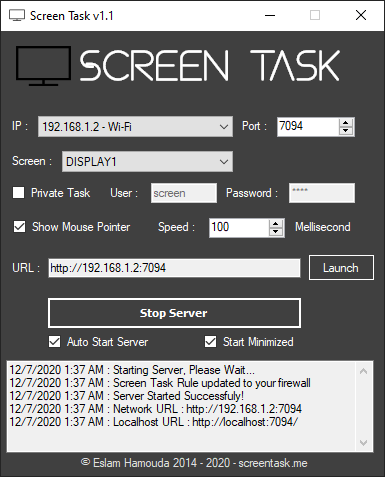
ScreenTask v1.2 Classic Edition
Preserved for legacy Windows Vista, Windows 7, Windows 8, 32-bit x86 workstations, and cross-platform Java environments.
ScreenTask v1.2 Classic (Windows)
Vista · 7 · 8 · 8.1 · 10 · 11 (32-bit & 64-bit)
The original ultra-compact HTTP polling edition. Ideal for older classroom PCs, 32-bit Windows installations, or retro hardware running .NET Framework 4.5+.
Advertisement
When Should You Use v1.2 Classic vs. ScreenTask 2.0?
| Criteria | ScreenTask v1.2 Classic | ScreenTask 2.0 (Recommended) |
|---|---|---|
| Supported Windows Versions | Windows Vista, 7, 8, 8.1, 10, 11 (32-bit & 64-bit) | Windows 10 & Windows 11 (64-bit x64) |
| Streaming Engine & Frame Rate | HTTP JPEG Polling (~2–5 FPS) | Binary WebSocket Stream (30–60 FPS, <50ms) |
| Disk Activity | Writes WebServer/ScreenTask.jpg to disk on every frame | 100% In-Memory RAM (Zero Disk Writes) |
| Audio Sharing | Not supported (video only) | WASAPI System Audio & Microphone Streaming |
| Capture Sources | Full monitors only | Full monitors + Individual application windows |
| Mobile Pairing | Manual IP & port typing | Instant QR Code Camera Scan + 5x Pinch-Zoom |

